In our contemporary, high-speed environment, the ability to manage time efficiently is paramount. From students gearing up for critical assessments to professionals juggling concurrent projects, and fitness buffs tracking high-intensity intervals, the need for a precise and accessible countdown timer is universal. Enter timers.onl: your premier online solution for mastering time with exactitude and elegance.
Understanding the Countdown Timer
A countdown timer is a specialized instrument that tracks time in reverse, starting from a specific duration and moving towards zero. Distinct from a standard clock that displays the current time, a countdown timer is purpose-built to signal the conclusion of a set period. This fundamental utility has infinite applications, ranging from perfecting a hard-boiled egg to enforcing strict work-rest ratios.
Cognitive science suggests that a visible ticking timer instills a sense of productive urgency. This 'time pressure' can sharpen focus, mitigate procrastination, and help prioritize immediate tasks. By visualizing time slipping away, you are subconsciously compelled to act efficiently.
Comprehensive Features of timers.onl
We have crafted timers.onl to be the ultimate time management tool, blending robust functionality with a polished user interface. Here is a deep dive into what makes our timer exceptional:
1. Prominent, Legible Display
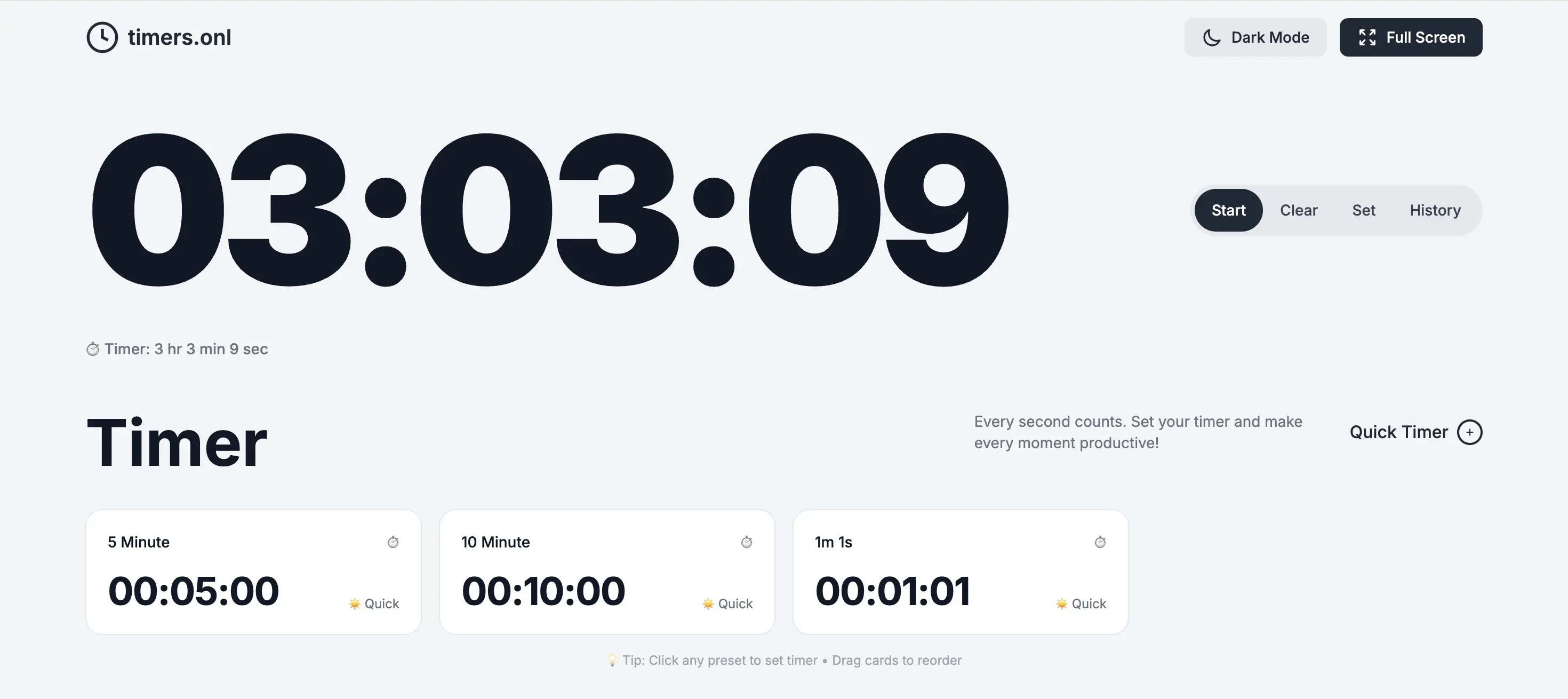
At the core of our platform is a massive, high-contrast display that renders time in HH:MM:SS format. This ensures readability from any distance, making it ideal for classrooms, conference halls, or gyms where you need to check the time at a glance.
2. Streamlined Controls
Navigating timers.onl is effortless thanks to our four primary controls:
- Start/Pause Button: Begin your countdown with a click. Need a break? Pause instantly and resume exactly where you left off.
- Clear Button: Reset the timer to zero instantly, allowing for a quick restart or new configuration.
- Set Button: Open the customization panel to dial in your exact duration using our smooth sliders.
- History Button: Accurate logs of your past sessions, available at the touch of a button.
3. Slider-Based Configuration
Forget typing numbers. Our intuitive slider interface allows you to drag and select hours, minutes, and seconds with fluid precision. It’s designed for touchscreens and mouse usage alike.
4. Custom Presets
Speed is key. We offer default presets for common intervals, but the real magic is in customization. Create your own 'Quick Timer' cards for your specific needs—be it a 20-minute nap or a 4-minute tabata round.
5. Drag-and-Drop Organization
Your workflow is unique. That’s why we let you arrange your timer cards in any order. Just drag and drop to prioritize your most-used presets.
6. Dual Notification System
Never miss a deadline. When the clock hits zero, a distinct audio chime plays, and the screen visually pulses in red. This ensures you are alerted even if the tab is in the background or your device is muted.
7. Detailed History Log
Review your productivity with our history tracker. Store up to 99 past entries to analyze your time usage patterns. You can manage this log easily, deleting individual items or clearing the slate entirely.
8. Eye-Friendly Dark Mode
Working late? Switch to our sleek Dark Mode to reduce eye strain. Your preference is remembered for your next visit.
9. Immersive Fullscreen
Remove distractions by going fullscreen. This mode is excellent for proctoring exams or leading group activities where focus is required.
10. Universal Compatibility
Our responsive design ensures a flawless experience on smartphones, tablets, laptops, and desktops. The interface adjusts dynamically to your screen size.
11. Auto-Save Preferences
We respect your setup. All your settings—from dark mode to custom presets—are saved locally in your browser, so everything is ready when you return.
Daily Use Cases
The versatility of timers.onl makes it invaluable across numerous scenarios:
- Productivity: Implement the Pomodoro method with 25/5 minute cycles.
- Education: Time exams, reading slots, or presentations.
- Fitness: Manage rest periods and active sets during workouts.
- Kitchen: Time baking and cooking prevents culinary disasters.
- Events: Keep meetings and speeches within their allotted time slots.
- Activities: Teachers can time tests and group transitions easily.
- Gaming: Fair time limits for board games and competitions.
Why timers.onl?
In a sea of apps, we stand apart because we are 100% Free (no ads, no fees), Privacy-Centric (no data collection), Web-Based (no installs), and Beautifully Designed for modern users.
Start controlling your day now. Time is fleeting—make every second count with timers.onl.